


Zeelool - Eyewear For Everyday
4.61.44K Reviews
App Specs
- Version
- 3.2.74
- Updated On
- License
- Free
- Downloads
- 1,000,000+
- Developer
- ZEELOOL
- Categories
- Shopping
- Platform
- Android
Screenshots
 Analysis by AppCompare
When I shop for glasses online, the hard part isn’t finding a frame I like; it’s working out whether it will suit my face and whether the order details are right. Zeelool - Eyewear For Everyday is built around that kind of decision, bringing eyewear browsing and ordering into a shopping app. I’d look to it when I want to explore styles at home, but I’d still treat frame previews as a guide rather than a substitute for checking my prescription and fit needs carefully.
Start with the choice you actually need to make
It helps to open the app with a clear purpose. Replacing everyday prescription glasses is a different task from browsing for sunglasses or comparing a bold frame with something understated. Zeelool covers prescription glasses, sunglasses and other eyewear, and its shopping focus is easy to understand: find a style, narrow down the options, then decide whether it belongs in your cart.
That makes it useful for someone who already knows roughly what they want but doesn’t have time to visit several optical shops. It can also help when you’re still exploring shapes and colors, because browsing is less committing than asking a store assistant to bring out frame after frame. The trade-off is that an online catalog can make it tempting to choose by appearance alone. I’d start with the role the pair needs to play—daily wear, sun protection, or a second look—before getting pulled into the options.
Browse, narrow, and use the preview wisely
Ever tried shopping for eyewear online and felt overwhelmed by the choices? Let me introduce you to Zeelool - Eyewear For Everyday, an app that's making waves in the world of online optical shopping. I decided to take it for a spin to see what all the buzz was about, and here’s my take on it.
First Impressions of Zeelool
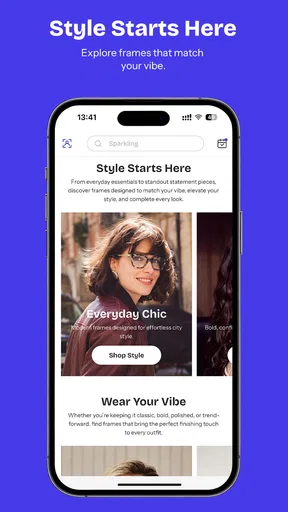
Downloading the Zeelool app was a breeze. It’s available for both Android and iOS, so you can get it from your preferred app store. Once installed, I was welcomed by a sleek and user-friendly interface. The color scheme is inviting and doesn’t strain the eyes—something you’d expect from an eyewear app.
The app quickly guides you through a simple process to set up an account, or you can skip this step and start browsing right away. I loved how intuitive the navigation was; everything from categories to filters is just a tap away.
For anyone who wonders whether browsing requires a commitment, the option to look around before setting up an account is a practical start. I’d use that time to compare a few candidates rather than adding every appealing frame to the cart. A short shortlist makes it easier to notice differences in shape and color, and it gives the virtual preview a more useful job: helping compare options, not making the decision on its own.
Worth Reading Before You Choose

EA SPORTS FC Mobile 26 Is a Bigger Football Game, but It Takes Time

Flipboard Shows What News Apps Must Do Beyond the Feed

Switching to Android Auto Means Rethinking Your Driving Routine

Google Calendar Makes a Crowded Week Easier to Manage

Ludo King Makes the Most of the Minutes Between Plans

Baby Panda World Brings Quick Play to Modern Phones, but Its Game Library Feels Busy
A Closer Look at Features
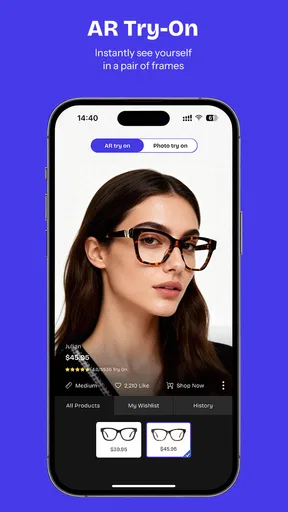
One of the standout features is the Virtual Try-On. Using my phone camera, I could see how different frames looked on me without having to visit a store. This nifty tool uses augmented reality to superimpose glasses on your face. It was pretty accurate, and I must say, it’s a game-changer for online shopping.
I’d still use that preview as a style check, not a fit guarantee. A camera view can help me judge whether a frame looks too prominent or whether a color works with my face, but it can’t replace checking dimensions and prescription information before ordering. That distinction matters most when buying glasses for daily use: the pair has to feel right through long stretches, not merely look good in a quick screen view.
A useful workflow is to try the same shortlist in similar lighting and with the camera held at a steady distance. Then I’d step away and return to the options later; a frame that seems exciting in the moment may not be the one I want to wear every day. This is a small habit, but it keeps the virtual feature in its strongest lane—visual comparison—while leaving the more technical checks for the order details.
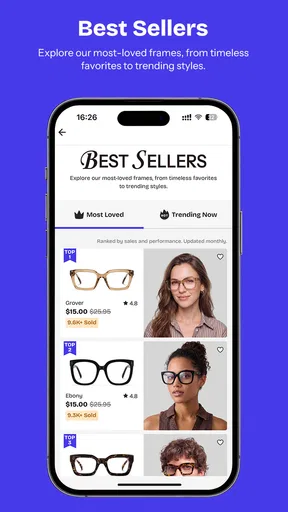
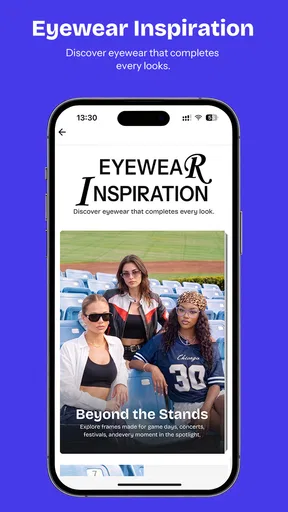
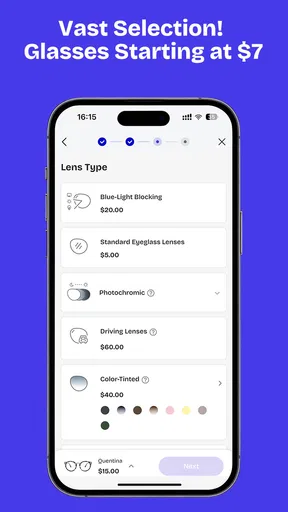
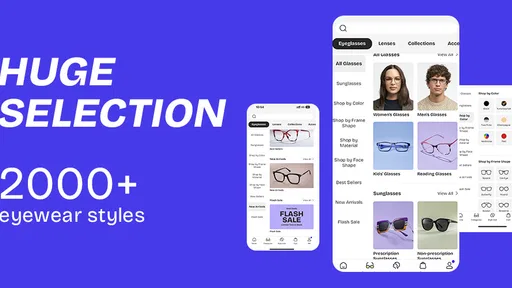
The app boasts a wide range of styles—from classic to trendy. Whether you’re looking for prescription glasses, sunglasses, or even blue light blocking lenses, Zeelool has got you covered. And let’s not forget the detailed filters that let you narrow down options based on frame shape, color, and material.
Those filters are most helpful when I use them to remove options rather than chase a perfect match. If I know I don’t want a particular shape or material, filtering first cuts down on distraction; after that, I can compare a few remaining frames by appearance. For a second pair, I might prioritize a different look. For the pair I rely on every day, I’d give comfort and prescription suitability more weight than novelty.
Shopping Experience
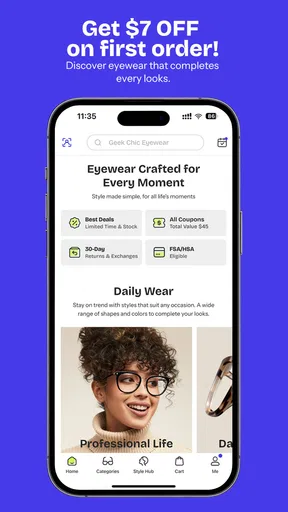
Shopping on Zeelool is as straightforward as it gets. Once you find a pair you like, adding them to your cart is quick and easy. The app keeps you updated with any ongoing sales or discounts, which is a nice touch for bargain hunters.
The affordable positioning makes the app appealing to shoppers who want to explore eyewear without beginning at a traditional optical counter. Still, I wouldn’t choose a frame only because it appears inexpensive or is promoted in a sale. The real comparison is the complete order and whether the selected pair meets my needs. I’d review the prescription choices, delivery details, and final checkout information before paying, especially if I’m buying a pair I expect to wear all day.
A realistic use case is replacing a scratched or outdated pair when I already have my prescription information and can shop after work. I could browse during a quiet moment, save a few likely styles in mind, and return to the strongest candidates before checkout. That is more convenient than squeezing a shop visit into a busy day, though it leaves me responsible for making the fit and prescription checks that an in-person conversation might prompt.
Payment options are flexible. You can choose from credit cards, PayPal, and even some mobile wallets. The checkout process was smooth, and I appreciated the transparency with shipping costs and estimated delivery dates.
For a purchase that needs to arrive by a particular occasion, I’d check the delivery estimate before treating the order as settled. The handoff from browsing to checkout is simple, but ordering eyewear is not quite like buying a decorative accessory: the prescription details and delivery timing both affect whether the result is useful. If I’m unsure about either, I’d pause and verify the information rather than rushing through because a frame looks right.
When an online order is the wrong handoff
Compared with the usual alternatives, this app’s advantage is that I can browse styles and use a camera preview without first traveling to an optical shop. A physical store is still the better choice when I need someone to help assess fit on my face, adjust frames, or talk through a prescription question in person. A general shopping marketplace may offer many products too, but Zeelool keeps the experience focused on eyewear rather than mixing glasses into a much broader catalog.
I’d skip app-based shopping for a pair if I couldn’t confidently enter the prescription information, if I needed a hands-on fitting before deciding, or if I wanted immediate help choosing a frame. Those are not failures of the app; they are situations where the online handoff from screen to finished glasses may not suit the buyer. If I were comfortable with my prescription and mainly wanted more choice at home, the balance would look different.
User Experience and Support
One thing that caught my attention was the dedicated customer support section. You can easily contact their team through the app if you have any questions or issues. They offer quick responses, which is a relief for any online shopper.
The app also includes a handy FAQ section and a guide on measuring your PD (pupillary distance) for those who are new to buying glasses online. It’s these little things that make the whole shopping experience stress-free.
That measuring guide is especially useful as a prompt to prepare before checkout, rather than something I’d skim after I had already chosen a frame. If I’m ordering prescription glasses, I’d gather the details I need first and take time with any measurement instead of guessing. If I’m uncertain about the result, asking support or checking with an eye-care professional is a safer next step than entering a number just to get through the cart.
For someone buying eyewear online for the first time, the natural question is whether the app can take them from browsing to a confident order. It makes the browsing and visual comparison approachable, and the support and measuring guidance can help with the next steps. But I’d still expect to bring my own care to the prescription and fit decisions. The app reduces some of the friction; it doesn’t remove the buyer’s part of the process.
Who will get the most from it
I think the strongest fit is a shopper who enjoys comparing designs, has their prescription details ready when needed, and is comfortable making an initial style choice from a screen. It also suits someone looking for sunglasses or a second pair, where the purchase can be guided more by style than by replacing a daily prescription pair. The filters and preview make exploration feel less random, while being able to browse before creating an account lowers the barrier to simply seeing what is available.
It may be less suitable for someone who wants to try frames physically before buying, needs immediate adjustments, or is still unsure what prescription information to use. In those cases, an in-person optician offers a more useful handoff from questions to fitting. I would also avoid relying on the virtual preview alone for a high-stakes everyday purchase; it is a helpful comparison tool, not proof that a frame will feel comfortable after hours of wear.
What the app is, and what it is not
Zeelool is a free shopping app from ZEELOOL, with an Everyone content rating. It has a 4.6 average from around 8,500 ratings, and it has passed over a million installs. Those figures suggest that plenty of shoppers use it, but I’d treat popularity as context rather than evidence that every frame or order will suit me. Its current version is 3.2.57, and it has been available since September 15, 2020.
The key question is whether I want a dedicated eyewear browsing experience or a face-to-face fitting. If it’s the former, this app gives me a convenient way to explore and compare from home. If it’s the latter, I’d choose a local optical shop and use the app another time for style ideas. That distinction makes the decision clearer than expecting one shopping route to be best for every pair.
Final Thoughts
Overall, the Zeelool - Eyewear For Everyday app impressed me with its ease of use, innovative features, and broad selection. It’s clear they’ve put a lot of thought into making eyewear shopping as convenient as possible. Whether you’re updating your look or just curious about trying virtual try-on tech, this app is worth downloading.
So, if you’re tired of the usual eyewear shopping hassles, give Zeelool a try. It might just change the way you shop for glasses forever!
My practical advice is to approach it as a visual shopping tool with a real order attached: shortlist first, use the preview to compare, and slow down at the prescription and delivery checks. That gives the app a fair chance to make browsing easier without asking it to solve fit questions a camera cannot answer. For the right shopper, it can make the search feel more manageable; for someone who needs hands-on guidance, a store remains the more dependable route.
Pros
- Wide variety of stylish frames available.
- Affordable pricing for quality eyewear.
- User-friendly interface for easy navigation.
- Virtual try-on feature is very accurate.
- Fast shipping with reliable tracking.
Cons
- Limited options for prescription lenses.
- Occasional app crashes reported by users.
- Customer service response can be slow.
- Some frames appear different in person.
- No in-app chat support available.
FAQs for Zeelool - Eyewear For Everyday
What features does the Zeelool app offer for eyewear shopping?
The Zeelool app provides a comprehensive eyewear shopping experience, including a virtual try-on feature, detailed product descriptions, and user reviews. You can browse a wide selection of eyeglasses and sunglasses, filter by frame shape, material, and color, and even get recommendations based on your face shape. The app also offers secure payment options and order tracking.
Is the virtual try-on feature accurate in the Zeelool app?
The virtual try-on feature in the Zeelool app uses augmented reality to provide a realistic preview of how different frames will look on your face. While it offers a good approximation, lighting conditions and camera quality can affect accuracy. Users often find it helpful for narrowing down choices, but it's always best to read user reviews and product descriptions for additional insights.
How does the return policy work for purchases made through the Zeelool app?
Zeelool offers a flexible return policy for purchases made through the app. If you're not satisfied with your eyewear, you can initiate a return within 30 days of receipt. The app provides step-by-step instructions for returning items, but it's important to ensure that the glasses are in their original condition and packaging. Refunds are typically processed within a week after the return is received.
Are there any discounts or promotions available on the Zeelool app?
Yes, the Zeelool app frequently features discounts and promotional offers, which can be found on the homepage or under the 'Deals' section. These can include seasonal sales, first-time buyer discounts, or exclusive app-only promotions. It's a good idea to enable notifications to stay updated on the latest deals and save on your eyewear purchases.
Is my personal information secure when using the Zeelool app?
Zeelool prioritizes user privacy and data security. The app uses encryption to protect your personal and payment information. They also adhere to strict privacy policies and do not share your data with third parties without consent. For added security, it's recommended to use strong passwords and ensure you're downloading the app from a trusted source like the Google Play Store or Apple App Store.


